You need to fill in a PDF form. You open Adobe Acrobat — wait, you don't have it installed. You search for a free PDF editor, find one, click upload... and now your sensitive document is sitting on a server somewhere.
There's a better way. You can fill a PDF form entirely in your browser — without uploading anything and without installing any software. It works on any device with a modern browser: laptop, tablet, or phone.
Here's everything you need to know about filling PDFs directly in your browser, including exactly how it works and why it's the safest option available.
TL;DR: PDF Form Filler runs entirely in your browser using local processing. Your files never leave your device. No upload. No installation. Works on Chrome, Edge, Firefox, and Safari — including mobile.
What Does "Fill a PDF in Your Browser" Actually Mean?
Traditionally, editing a PDF required either expensive desktop software (Adobe Acrobat Pro) or uploading your document to a third-party website. Both have significant downsides — one costs money, the other exposes your data.
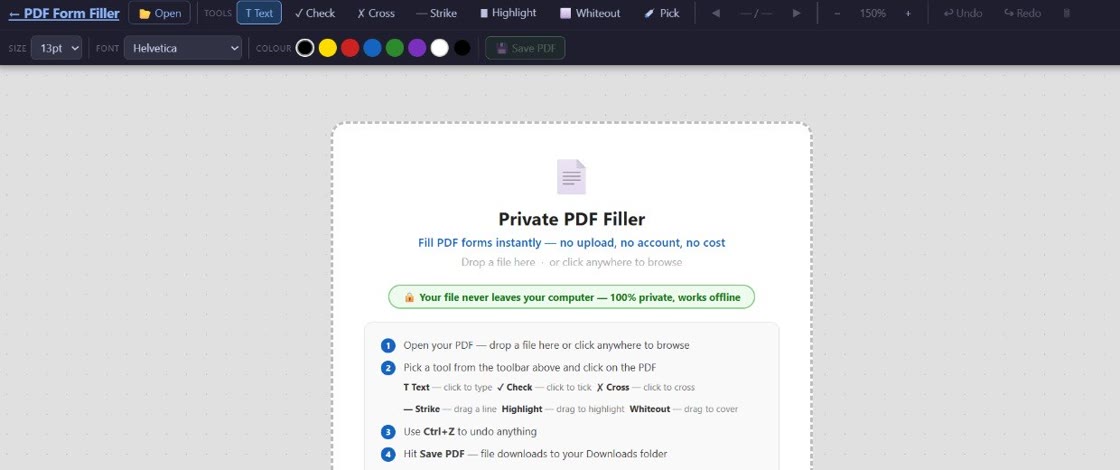
Browser-based PDF editing is different. The PDF processing happens locally — right inside your browser using web technologies like WebAssembly. The file never leaves your computer. You open the app in your browser, load your PDF, type in your text, check boxes, and save the result — all without a single byte being transmitted over the internet.
This isn't a stripped-down preview either. Modern browser-based PDF tools can handle text fields, checkboxes, radio buttons, dropdowns, signatures, and free-form text annotations — everything you'd expect from a desktop PDF editor.
Why Fill PDFs in Your Browser?
There are four big reasons to choose a browser-based approach:
Complete privacy — no upload required
Your PDF never leaves your device. There's no server to intercept your data, no third-party handling your documents, and no deletion policy to trust. Your file stays on your computer from start to finish.
No software to install
No downloads, no installers, no license keys, no updates to manage. Open your browser, navigate to the tool, and start working immediately. It's ready whenever you are.
Works on any device
Desktop, laptop, tablet, or phone — if it has a modern browser, it can fill PDFs. No need to hunt for a mobile app or deal with platform limitations. The same tool works everywhere.
Free, with no catches
Browser-based tools don't need server infrastructure (since nothing is uploaded), so they can be offered free without hidden costs or subscription upsells. PDF Form Filler is completely free, always.
How to Fill a PDF in Your Browser in 3 Steps
The process is refreshingly simple. Here's exactly how to fill a PDF form using a browser-based tool like PDF Form Filler:
Open PDF Form Filler in your browser
Navigate to pdfformfiller.buildai.nz/app/. No account needed, no sign-up required. The page loads the PDF editor entirely in your browser.
Load your PDF
Click to open your PDF from your computer. Because processing happens locally, there's no progress bar or upload time — the file loads immediately. Your document is processed on your device and never transmitted anywhere.
Fill in the form and save
Click on any text field, checkbox, or radio button to fill it in. Type directly, select options, and add text annotations where needed. When you're done, click save — the filled PDF downloads straight to your device.
That's it. No uploads, no installations, no accounts. The entire workflow takes seconds.
Frequently Asked Questions
Can I fill a PDF without Adobe Reader or Acrobat?
Absolutely. Adobe Reader or Acrobat is not required. As long as you have a modern web browser — Chrome, Edge, Firefox, Safari, or any Chromium-based browser — you can fill PDF forms using a browser-based tool like PDF Form Filler. There's no dependency on Adobe software at all.
Does PDF Form Filler work on Chrome, Edge, Firefox, and Safari?
Yes. PDF Form Filler works on all modern browsers. The tool uses standard web technologies that are supported by Chrome, Edge, Firefox, and Safari. As long as your browser is reasonably up to date, it will work without any issues.
Does it work on mobile browsers?
Yes, PDF Form Filler works on mobile browsers including Safari on iOS and Chrome on Android. The interface is responsive and adapts to smaller screens. You can fill PDF forms on your phone or tablet just as easily as on a desktop computer.
Do I need to download anything?
No downloads, no installations, no plugins. Everything runs in your browser. The only file that gets saved is your completed PDF — which you download directly to your device when you're done. There's nothing else to install or manage.
Browser-Based vs. Desktop Software vs. Upload Tools
Here's how the three approaches compare at a glance:
Desktop software (Adobe Acrobat, Preview, Foxit): Powerful but requires installation, takes up disk space, needs updates, and usually costs money for full functionality. Good if you work with PDFs daily, but overkill for occasional form filling.
Server-based upload tools (Smallpdf, ILovePDF, etc.): Convenient but send your file to a remote server. Your data leaves your control, even if only temporarily. Privacy policies and deletion practices vary widely and are difficult to verify.
Browser-based local tools (PDF Form Filler): The best of both worlds — no installation required, no upload involved, no data leaves your device. Works everywhere, costs nothing, and keeps your documents private. For filling in a PDF form, it's the ideal solution.
Bottom line: If you need to fill a PDF form occasionally — especially one with sensitive information — browser-based local editing is the fastest, safest, and most convenient option available.
Fill your PDF right now — nothing to install
PDF Form Filler runs in your browser. Your files never leave your device. Free, always.
👉 Fill your first PDF form