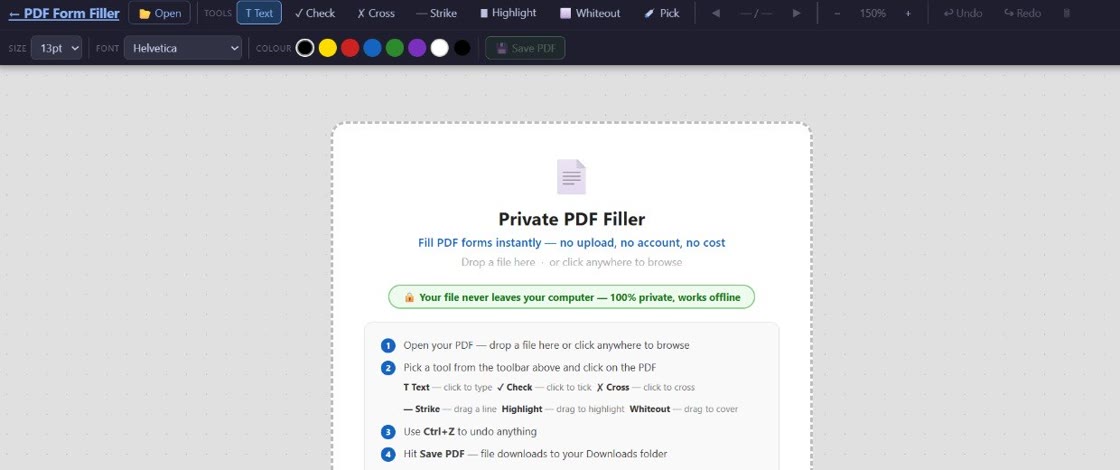
If you care about privacy, you already know the drill: check the permissions, read the privacy policy, wonder whether the free tool you just used is selling your data or storing your documents on a server halfway around the world. But when it comes to PDF forms, most of us settle for what's easy — and hope for the best.
The problem is that "private" means very different things to different PDF tools. Some encrypt your data in transit and promise to delete it; others process everything in plain sight on remote servers. A growing number of tools — including PDF Form Filler — keep everything on your own machine and never transmit a single byte.
This guide breaks down what privacy actually means for a PDF form filler, compares the major approaches, and helps you find the best tool for your needs — without compromising on security.
What Makes a PDF Form Filler "Private"?
Not all privacy is created equal. When a tool claims to be private, here are the specific criteria that actually matter:
Local processing (no upload)
The most important distinction: does your file ever leave your device? Tools that process PDFs locally in your browser never send your document to any server. Your data stays where it belongs — on your machine.
No server-side storage
Even tools that claim to "delete after processing" may store your file temporarily on their servers. Local tools eliminate this entirely — there's nothing to delete because nothing was ever stored.
No document-content tracking
Ordinary website analytics should never capture your PDF, form fields, signatures or document contents. What you fill in should remain nobody's business but yours.
No sign-up required
Requiring an email address or account creation to use a PDF tool is often a data collection strategy. The best private tools work immediately, with zero barriers.
Bottom line: A truly private PDF form filler processes your documents entirely on your device. If it can work offline — or at least doesn't need to send your file anywhere — that's the gold standard.
Can Server-Based Tools Really See My Documents?
This is the question everyone wonders but few ask directly. The honest answer is: it depends on the tool, but the risk is real.
When you upload a PDF to a cloud-based service, the file travels from your device to the company's server. Even with HTTPS encryption (which prevents third parties from intercepting it in transit), the server receives the file in a fully readable state. The company's infrastructure — its processing pipeline, its temporary storage, often its employees — has access to that data.
Here's what that means in practice:
Automated processing is still access. Even if no human at the company ever reads your file, automated systems process every byte. Whether those systems log, cache, or repurpose data depends entirely on the tool's architecture and policies.
"Temporary" storage isn't always temporary for backups. A file deleted from the active system after one hour may still exist in nightly backups for weeks. Many backup systems are automated and don't distinguish between "delete from primary" and "delete from all archives."
Data breaches are a fact of life. In 2024 alone, major SaaS platforms reported breaches exposing user-uploaded files. Even a company with good intentions can be compromised — at which point every file they've ever processed becomes vulnerable.
Terms of service can change. A tool that promises privacy today may update its terms tomorrow. Once your file is on their server, you've lost control over where it ends up.
The short version: Yes, server-based tools can see your documents. Whether they actually do is a matter of trust, policy, and luck. Local tools eliminate the question entirely.
How Does PDF Form Filler Compare to Other Tools?
Let's look at how the major categories of PDF form fillers stack up on the privacy front:
The comparison makes one thing clear: the fundamental difference isn't in features or interface design — it's in where your data lives. Server-based tools, no matter how well-intentioned, operate on your documents away from your control. Local tools don't.
There are a handful of other locally-processing PDF tools on the market. Some are desktop applications (requiring an install), others are browser-based like PDF Form Filler. What sets PDF Form Filler apart is that it requires no installation, no sign-up, and no payment — while still processing every file 100% locally in your browser.
Does PDF Form Filler Track Me?
This is a fair question, and it deserves a direct answer. PDF Form Filler does not track your PDF contents, form entries, signatures or filenames. It does use ordinary website analytics. Here's exactly what the tool does and doesn't collect:
What we do not collect:
- Your PDF files — they never leave your device
- Your personal information — no accounts, no emails
- Form fields you fill or content you type
- Your signature, annotations or completed document
What we do collect (and why):
- Google Analytics website/app usage, such as pages viewed, device/browser, approximate location and referral source
- CTAs and navigation clicks — purely to understand how people find the app
- Aggregate product events such as app opens, PDF opens and PDF saves — never the file or its contents
None of these analytics ever touch your PDF content. There is no session recording, form-field tracking or heatmapping. Google Analytics is used for ordinary website and app usage as explained in the Privacy Policy.
Privacy promise: PDF Form Filler processes every form field, every checkbox, and every signature entirely inside your browser. What you fill stays with you. Period.
When You Need a Private PDF Form Filler
Some situations genuinely demand the highest level of privacy. Here are the most common ones:
Tax returns and financial forms
Your IRD number, bank accounts, and income details are prime targets for identity theft. Never upload these to a server-based tool.
Medical and health documents
Patient intake forms, prescriptions, and referral letters contain protected health information. Local processing is a requirement, not a preference.
Legal contracts and NDAs
You wouldn't email a confidential contract to a stranger — don't upload it to one either. Local tools keep the terms where they belong.
Government and immigration forms
Passport copies, visa applications, and residency forms contain everything needed for identity fraud. Process these locally.
How to Verify a Tool Is Actually Private
Not sure whether a PDF tool is truly local? Here's how to find out:
Test with Wi-Fi off. If the tool works completely offline (after the initial page load), that's a strong sign processing happens locally. Tools that need a server connection will show errors or fail to load your document.
Check the network tab. Open your browser's developer tools (F12), go to the Network tab, and watch what happens when you load a PDF. If you see requests to external servers containing your file data, it's not truly local.
Read the documentation. Transparent tools explain their architecture. Look for language like "processes locally in your browser" or "files never leave your device." If the documentation is vague about how data is handled, that's a red flag.
Look for a privacy policy. Legitimate privacy tools have one. If the company can't be bothered to document how they handle data, they're almost certainly not prioritizing your privacy.
Why Local Processing Is the Future
Browser technology has advanced to the point where almost any PDF operation can be performed locally. WebAssembly, the File API, and modern JavaScript PDF libraries mean that the old justification for server-side processing — "the browser can't handle it" — no longer holds.
This shift benefits everyone:
For users: Complete privacy, no data exposure, no trust required. The tool simply works on your terms.
For developers: No need to build and maintain server infrastructure for file processing. No data compliance headaches. No breach liability.
For the industry: A growing expectation that "online" doesn't have to mean "uploaded." More tools are moving toward local processing, and the market is rewarding them for it.
The question isn't whether local processing works — it's why every PDF tool isn't doing it already.
The most private PDF form filler is the one that never sees your files
PDF Form Filler processes your PDF 100% in your browser. No PDF uploads. No document-content tracking. Free.
👉 Try it now — no sign-up neededFrequently Asked Questions
What makes a PDF form filler "private"?
A private PDF form filler processes your documents entirely on your own device — usually in your browser or a local application — without ever transmitting, storing, or sharing your file with any external server. True privacy means no uploads, no temporary copies, no analytics on your content, and no sign-up that ties your identity to your documents.
Can server-based tools really see my documents?
Yes. Even with HTTPS encryption, the server receives your PDF in a fully readable state. The company's infrastructure — automated processing pipelines, temporary storage, backups, and in some cases employees — has access to the contents of your file. While many tools have privacy policies promising deletion, you have no way to independently verify what happens once your data leaves your device.
How does PDF Form Filler compare to other tools?
Unlike most online PDF tools that process files on remote servers, PDF Form Filler runs everything locally in your browser. Your files never leave your device. It requires no sign-up, no installation, and no payment. Other locally-processing options exist (some browser-based, some desktop apps), but PDF Form Filler combines true local processing with instant accessibility — just open the page and use it.
Does PDF Form Filler track me?
PDF Form Filler does not track your PDF content, form fields, signatures or filenames. We use Google Analytics and privacy-safe product events to understand ordinary website and app usage, but none of this ever touches your PDF data. See the Privacy Policy for details.