You need to fill a PDF form. You find a tool online. You click "Get Started" — and then the wall appears. Create an account. Enter your email. Verify your inbox. Choose a password. Three minutes later, you're finally filling out the form you opened in the first place.
It doesn't have to be this way. PDF Form Filler is built with a simple philosophy: you should be able to open a PDF, fill it, and download it — without signing up for anything, ever.
Here is why no sign-up matters, and why more PDF tools should work this way.
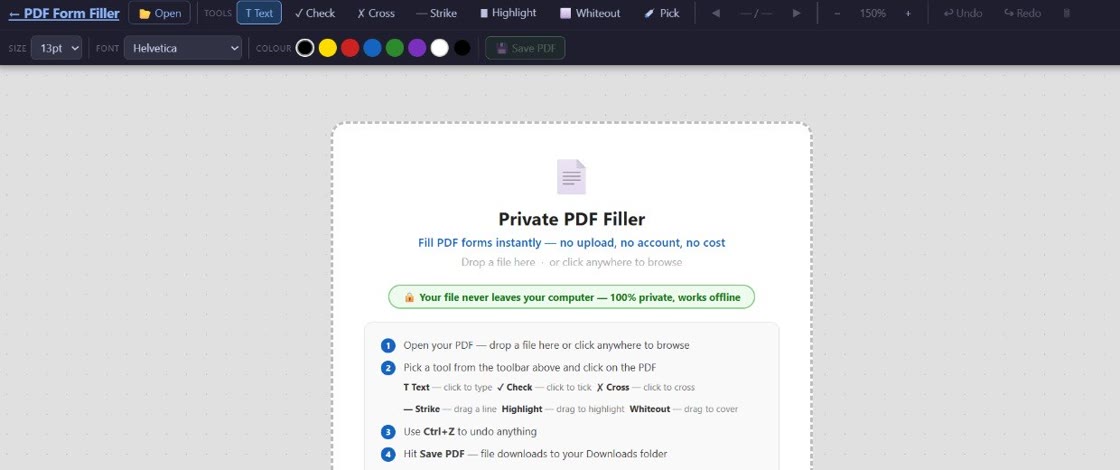
No account needed: PDF Form Filler never asks for your email, name, or any personal information. Open the app, upload a PDF, fill it out, and download the result. That is the entire workflow — and it always will be.
The Friction of Sign-Up Walls
Every time a website asks you to create an account before using a basic tool, there is a cost. It might seem small — a few seconds, a password manager autofill — but it adds up, especially when you are filling multiple forms in a single session.
Consider what a sign-up process typically involves:
You type or paste your email address
Basic, but it interrupts your workflow. If you use a different email for marketing-prone services (as many people do), you need to switch contexts to generate or retrieve one.
You wait for a verification email
This is the biggest bottleneck. Emails can take seconds or minutes. Spam filters sometimes eat them. If you typo'd your address, you start over.
You create and confirm a password
Another step. Another password to manage. Another entry in the password manager. Another site that, if breached, exposes credentials you may reuse elsewhere.
You finally access the tool
By now the friction has added 60–120 seconds of overhead. Over a year of occasional PDF filling, that adds up to real wasted time.
Why Do Most Tools Require Sign-Up?
The answer is almost always business model, not technical necessity. Server-based PDF tools incur costs for every file they process — storage, bandwidth, CPU time. Requiring an account lets companies:
Build a marketing list. Your email address is valuable. Companies collect it through sign-ups and then use it for promotional emails, upsells, and cross-selling other products.
Enforce usage limits. Accounts make it easy to track how many documents a user has processed, and to impose free-tier caps that encourage paid upgrades.
Sell or monetise data. Some free tools recoup costs by analysing uploaded documents or selling aggregated usage data to third parties.
These are valid business strategies, but they are not aligned with what users actually want: a fast, private way to fill a PDF form.
Important distinction: PDF Form Filler does not need sign-up because it does not use servers to process your files. Everything happens locally in your browser. There are no computing costs per user, no files to store, and no data to monetise. The business model is simple — the tool works, and it is free.
How PDF Form Filler Works Without Sign-Up
PDF Form Filler achieves its zero-sign-up experience through local, browser-based processing. Here is how it works:
When you visit the app, the entire PDF editing engine loads into your browser as a web application. There is no backend server handling your file. When you upload a PDF, it is read entirely within your browser's memory using JavaScript. You fill in the form fields, and the completed PDF is generated on your device. Nothing is ever uploaded, transmitted, or stored anywhere else.
This architecture has several benefits beyond privacy:
No account infrastructure to build or maintain. There are no databases of user accounts, no email verification systems, no password reset flows. The engineering effort goes entirely into the core product.
No usage limits. Because there are no server costs, there is no reason to cap how many forms you can fill. Use it once a week or fifty times in a day — it makes no difference to us, and no difference to you.
No data to lose. When a sign-up-based tool shuts down or changes its terms, users lose access to their data and habits. With a no-sign-up tool, there is nothing to lose. You just keep using it as long as it exists.
Frequently Asked Questions
Can I really fill PDFs without signing up?
Yes, absolutely. PDF Form Filler requires no account creation, no email address, and no login of any kind. You simply open the app in your browser, upload your PDF, fill in the fields, and download the completed file. There is no registration wall, no free trial that eventually asks for a credit card, and no limit on how many forms you can fill. It works immediately, every time.
What's the catch if it's free and no sign-up?
There is no catch. The app runs entirely in your browser using local processing, so there are no server costs to cover from usage. There are no ads, no data selling, no hidden limits, and no upsells. The tool stays free because it processes everything on your device — we never receive or store your files.
How is this better than tools that require an account?
No sign-up tools are faster, more private, and more convenient. You skip the time wasted on creating yet another account and verifying yet another email. Your documents never touch a server, so there is no risk of data breach on someone else's infrastructure. And you never need to manage or remember another password.
Do you still offer product updates?
Yes. Because PDF Form Filler runs entirely in your browser, every time you visit the app you automatically get the latest version. There is nothing to download, nothing to update, and no account needed to receive improvements. New features, performance enhancements, and fixes are available instantly with every visit.
The Bottom Line
Sign-up requirements are almost never about making the product better for you. They are about building a relationship that benefits the company — through email marketing, data collection, or upselling premium tiers.
PDF Form Filler takes a different approach. The tool is useful on its own terms. It does not need your email to work. It does not need your data to improve. It does not need a relationship to justify its existence. It simply fills PDF forms, and it does that well.
If you are tired of creating accounts for every online tool you use, give it a try. No sign-up. No email. No password. Just a PDF form, filled.
Try it now — no sign-up needed
PDF Form Filler works instantly in your browser. No account, no email, no limits.
👉 Fill a PDF form — free