Medical forms are some of the most sensitive documents most of us will ever handle. Patient intake forms, referral letters, prescriptions, medical history questionnaires, and consent forms all contain deeply personal health information — data that is protected by law and should never end up in the wrong hands.
Yet many people turn to free online PDF editors to fill these forms, not realising that their health records are being uploaded to servers they know nothing about. This article explains how to fill medical form PDFs privately, without ever sending your data anywhere.
Important: Health information is legally protected under HIPAA (US), the GDPR (EU), the Privacy Act (NZ), and similar laws worldwide. Uploading medical PDFs to an unverified online tool may violate both the law and your duty of care as a patient or practitioner.
How Most Online PDF Tools Handle Your Medical Data
When you visit a typical free PDF website and upload a medical form, here is what happens behind the scenes:
Your medical form is uploaded to a server
The PDF containing your or your patient's health information is transmitted over the internet to a data centre — often located in a different country with different privacy laws.
It is processed on someone else's computer
Server-side software opens, reads, and modifies your file. The contents of your medical record are accessible to that system during processing.
The file is stored (even if temporarily)
Most services hold onto your file for a period ranging from 30 minutes to 24 hours. Backups may persist much longer, and there is no way for you to verify deletion.
You download the result — but your data remains
Even after you have your filled form, the original and processed copies may still reside on the provider's servers, accessible to their staff or vulnerable in a breach.
For a recipe PDF or a public brochure, this is not a concern. For a medical form containing diagnoses, medications, and personal identifiers, it is a significant privacy risk.
Why Medical PDFs Need Extra Protection
Medical documents are not like other PDFs. They contain information that, if exposed, can lead to discrimination, identity theft, or embarrassment. Here is what is typically inside a medical form:
Personal identifiers
Full name, date of birth, address, phone number, NHI number, Medicare number, or other national health identifiers that can be used to link records across databases.
Medical history and diagnoses
Current and past conditions, surgical history, allergies, immunisations, and family medical history — information that reveals deeply private aspects of a person's life.
Medications and prescriptions
Current prescriptions, dosages, and prescribing physician details. This can reveal treatment for sensitive conditions including mental health, reproductive health, and chronic illness.
Insurance and billing information
Health insurance policy numbers, claim details, and payment information that links medical treatment to financial data, creating a richer target for identity thieves.
Why this matters: In many jurisdictions, uploading identifiable health data to a server without appropriate safeguards may constitute a breach of privacy regulations. Even with patient consent, using an unverified third-party tool to process medical forms introduces unnecessary risk.
The Browser-Based Alternative: How Local Processing Works
The most private way to fill a medical PDF is to process it entirely on your own device — without uploading it anywhere. Modern browser technology (specifically the File API and PDF rendering engines built into browsers) makes this possible.
Here is how local processing differs from server-based tools:
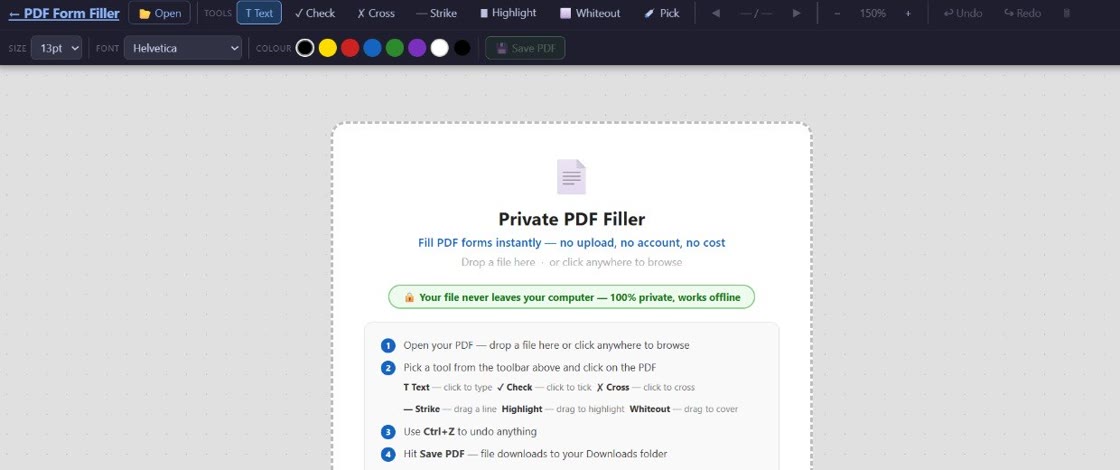
With PDF Form Filler, your medical form never leaves your device. You open the app in your browser, select your PDF, fill in the fields, and save the completed document — all within your own computer's memory. No data is transmitted to a server at any point.
This approach works with any PDF form, including standard AcroForm fields as well as flat PDFs where you need to add text manually. Patient intake forms, referral letters, consent forms, and prescriptions all work seamlessly.
Can I Fill Medical PDF Forms Privately?
Yes, absolutely. The key is choosing a tool that processes everything locally. With PDF Form Filler, you simply open the form in your browser, type your information directly into the fields, and save the completed PDF to your computer. Your medical data never touches a server.
This is different from most "online" PDF editors, which actually upload your document to a remote server, process it there, and send the result back to you. That difference — processing on your device versus processing on a server — is the entire privacy distinction.
Are My Health Records Protected When I Fill Them Online?
It depends entirely on the tool you use. With server-based tools, your health records are protected only as well as the company protects its servers. You have no control over encryption standards, retention policies, or employee access controls.
With a local processing tool like PDF Form Filler, your health records never exit your device, so the protection question becomes: is your own computer secure? That is a much simpler concern to manage. Keep your operating system updated, avoid public Wi-Fi when handling sensitive forms, and save the completed PDF to a secure location.
For healthcare professionals handling patient forms, local processing also helps meet compliance obligations. Since no data is transmitted to third-party servers, you avoid the need to assess whether a PDF editing tool meets HIPAA or GDPR requirements for data processing agreements.
What If I Need to Email My Filled Medical Form to a Clinic?
This is a common workflow: you fill a medical PDF privately and then need to send it to a doctor, clinic, or hospital. The good news is that local processing does not prevent you from sharing the completed form — you just control when and how it gets transmitted.
Here is the recommended approach:
1. Fill the form locally using PDF Form Filler. Your data stays on your device.
2. Save the completed PDF to your computer with a clear filename.
3. Send it securely. Use email encryption if your email provider supports it, or use the patient portal that most clinics now offer. Many clinics have secure message centres within their practice management software that accept PDF attachments.
The advantage is that you have never exposed your raw medical data to an unknown third party during the filling process. You only share the final, completed form through a channel you choose and trust.
Do I Need to Create an Account to Fill Medical PDFs?
No. PDF Form Filler does not require an account, registration, or email address. You can fill any medical PDF immediately, without signing up or providing any personal information. This is by design: if there is no account, there is no stored profile, no saved documents, and no data trail that could be compromised in a breach.
Many server-based PDF tools require accounts for reasons that have nothing to do with your needs — they want email addresses for marketing, or they need to track usage. A private PDF filler should not need any of that.
How to Fill a Medical PDF Privately in Three Steps
The process is straightforward and takes less time than signing up for a typical online tool:
Step 1 — Open PDF Form Filler
Navigate to the app in your browser. No download, no installation, no sign-up. The app loads and runs entirely in your browser.
Step 2 — Select your medical PDF
Choose the patient intake form, referral letter, prescription, or other medical PDF from your computer. The file is read locally — it is not uploaded anywhere.
Step 3 — Fill and save
Type into the form fields or add text annotations where needed. When you are done, save the completed PDF to your device. Your private health information never left your computer.
Common Medical Forms You Can Fill Privately
PDF Form Filler works with virtually any medical PDF, including:
Patient registration and intake forms, medical history questionnaires, consent to treatment forms, HIPAA authorisation forms, referral letters from GPs to specialists, prescription forms, discharge summaries, pre-operative assessment forms, mental health intake questionnaires, insurance claim forms, and Medicare or ACC claim documents.
All of these can be filled privately, without uploading, and without creating an account.
Frequently Asked Questions
Can I fill medical PDF forms privately?
Yes. By using a local processing tool like PDF Form Filler, your medical PDF is never uploaded to a server. Everything happens inside your browser on your own device. This is the same level of privacy as editing a document on your desktop computer.
Are my health records protected when I fill them online?
With server-based tools, your records are only as protected as the company's infrastructure and policies allow. With local processing tools, your data never leaves your device, so the risk is dramatically lower. No server means no server breach, no data retention policy to worry about, and no third-party access.
What if I need to email my filled medical form to a clinic?
Fill the form locally first, then send the completed PDF through a channel you trust — such as a secure patient portal or encrypted email. The key difference is that your raw medical data was never exposed to an unknown third-party service during the filling process.
Do I need to create an account to fill medical PDFs?
Not with PDF Form Filler. No account, no registration, no email required. You open the app, select your file, fill it in, and save. That's it. No personal information is collected because none is needed.
The Bottom Line
Medical forms contain some of the most sensitive personal data you will ever put into a document. Uploading them to an unknown server to edit them is an unnecessary risk — especially when a private, browser-based alternative exists that is just as fast and completely free.
PDF Form Filler processes everything locally. Your files never leave your device. No accounts, no uploads, no exposure. Just a simple, private way to fill medical PDFs.
Fill medical PDFs privately — no upload required
PDF Form Filler runs locally in your browser. Your health information never leaves your device. Free, always.
👉 Start filling your medical forms — free