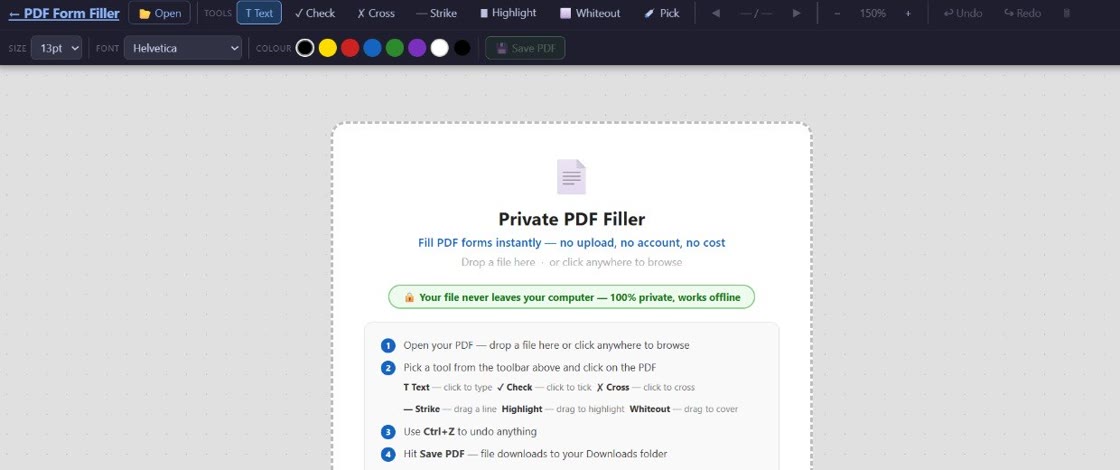
Complete HMRC forms, DBS checks, tenancy agreements, and UK government documents securely — right in your browser. Your files never leave your device.
No sign-up · No upload · Works instantly · Built in New Zealand by BuildAI.nz
Drag and drop your PDF into the app. Nothing is uploaded anywhere — it opens right in your browser.
Click any field and start typing. Add tick marks, crosses, change font size, or erase text as needed.
Download your completed PDF straight to your device. Clean, filled, ready to submit or email.
No account. No delays. No unnecessary upload.
Complete Self Assessment returns, PAYE forms, VAT returns, and other HMRC documents privately — your tax info stays on your device.
Fill in Disclosure and Barring Service application forms without uploading personal data to third-party servers.
Complete assured shorthold tenancy agreements, inventory checklists, and rental forms for UK landlords and letting agents.
Fill in DWP claim forms, UC journals, and benefit application documents securely before submitting via government portals.
Patient intake forms, GP referral letters, and health questionnaires — keep your medical information completely private.
Passport applications, DVLA forms, voter registration, and any other UK government PDF — filled privately, no upload.
Your PDF never touches a server. Everything runs locally in your browser. No one else ever sees your UK documents — not even us.
Click any spot on your PDF and start typing. Adjust font size to fit any field — tiny HMRC boxes or wide tenancy agreement lines.
Place checkmarks or crosses anywhere on a form. Perfect for consent forms, DBS applications, and legal UK documents.
Pick any colour for your text to match form requirements or stand out clearly on the document.
Made a mistake? Erase any text you've added and start fresh. Non-destructive — the original PDF is never changed.
Runs in a modern browser with no heavy desktop software or browser extension to install. Works on Windows, Mac, and Linux.
Need to fill a PDF form quickly in the UK? Whether it's an HMRC Self Assessment return, a DBS check application, a tenancy agreement, or a Universal Credit claim, PDF Form Filler lets you complete the document instantly — no software to install and no files uploaded to the cloud.
UK residents handle a lot of paperwork. From DVLA licence applications to NHS medical forms, from passport renewals to rental contracts — there's always a PDF that needs filling. This tool gives you a simple, secure way to edit PDFs directly in your browser.
Unlike other tools that upload your sensitive documents to remote servers — often located outside the UK and subject to different data protection laws — PDF Form Filler runs entirely on your device. Your documents never leave your computer. Not to our servers, not to anyone's.
It's the simplest way to fill a PDF form online in the UK without Adobe Acrobat, without a subscription, and without compromising your privacy. Built with the same UK-GDPR-aligned privacy principles we apply to all our tools.
"I filled my entire Self Assessment form without uploading it anywhere. Finally something that respects my privacy."
"I use this weekly for tenancy agreements. So lightweight and fast. No messing around with Adobe subscriptions."
"Couldn't be simpler. Opened my DBS form, filled it in, saved it. Done in two minutes. Nothing to install."
Yes, the core PDF filling tool is free for everyone — including UK users. No page limits, no hidden fees. We may add optional paid features later, but the basic editor stays free.
Correct. PDF Form Filler runs entirely in your browser using local processing. Your HMRC forms, DBS applications, and tenancy agreements are never sent to any server — not ours, not anyone's.
Yes. If it's a standard PDF, it works. HMRC Self Assessment forms, DBS check applications, DVLA documents, Universal Credit forms, and most UK government PDFs can be filled using the tool.
No account, no sign-up, no email address required. Open the app and start using it immediately.
Because your PDF never leaves your device, no personal data is transmitted or stored by us. There's nothing to process, so there's nothing to breach. We designed it with UK and EU privacy standards in mind from day one.
Absolutely. Once you save your completed PDF, you can attach it to an email, upload it to a government portal like gov.uk, or print and post it — just like any other PDF. The tool outputs a standard, clean PDF file.
No sign-up. No credit card. No nonsense.
Just open your PDF and start filling — right now.
Runs in your browser · No upload required · Built in New Zealand by BuildAI.nz
Free for personal & home use. Free exports may include a small footer.
NZD · Pay once, use forever. Removes footer from exports.